On-Site QR Code Positioning
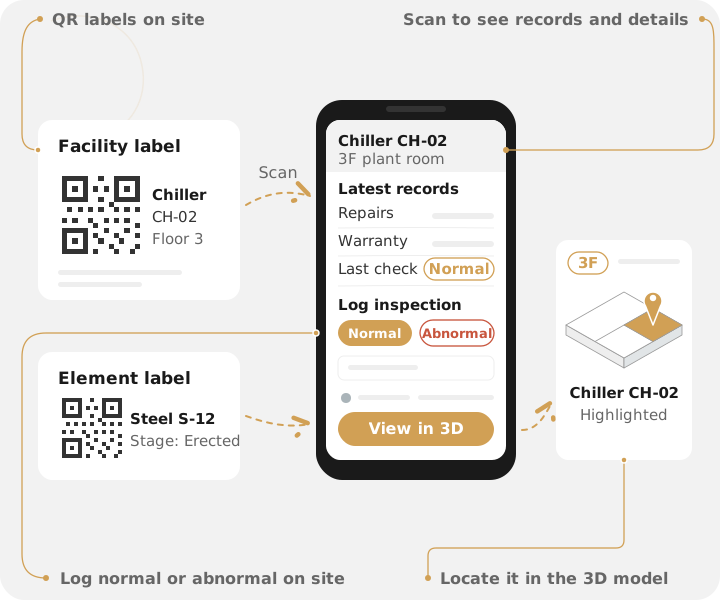
- QR LabelsPrint labels from the viewer and attach them to facilities, equipment, or elements on site
- Phone ScanningAfter logging in with a personal IPCS account, scan with a phone browser to see the details
- Inspection RecordsFacility labels can log normal or abnormal, and keep a record of who scanned, when, and where
- View in 3DOpen the model directly, switched to the right floor with the facility or element highlighted
Problems & solutions
Looking at a piece of equipment or an element, you can't tell which one it is in the model
Print labels from the viewer and attach them to facilities, equipment, or elements
Each facility and element on site maps directly to the BIM model
Checking equipment details or the latest records means going back to the office or asking someone
Scan in a phone browser to see facility information and the latest management records
Facility records and an element's construction stage are visible right on site
Results sit on paper or in messaging apps, with no clear record of who checked, when, and where
A facility label can record normal or abnormal with notes, and keeps a scan record
Every scan keeps the person, time, and location
In a whole-building model you have to search floor by floor yourself
Open the model directly, switched to the right floor with the location highlighted
No need to search the model yourself
Features
Labels and scanning
QR labels on site
Print QR labels from the viewer and attach them on site: in Building Management BIM they go on facilities or equipment, and in Construction Progress BIM on elements such as curtain walls and steel members.
Scan with a phone
After logging in with a personal IPCS account, site staff scan with a phone browser to see a facility's information and latest management records, or an element's current construction stage.
Site inspection records
A facility label in Building Management BIM lets staff log the inspection result on site, either normal or abnormal with notes, and keeps a record of who scanned, when, and where.
View in 3D
After scanning, open the model directly, switched to the right floor with the facility or element highlighted, so you don't have to search the model yourself.
Labels without URLs
A QR label's content contains no web address, so scanning never opens an external link, which helps guard against fake labels.
vs. traditional methods
Labels map to the actual facility or element in the model, and scanning shows the latest records or construction stage
View in 3D opens the model on the right floor with the location highlighted
The label content has no web address, scanning opens no external link, and a personal login is required
Who it's for
Property management, operations teams
Scan facility labels during inspections, see the latest records, and report normal or abnormal.
Contractors, site managers
Scan an element on site to see its current construction stage.
Supervising firms
Scan element labels on site, check the construction stage, and confirm the location in the model.
Owners, developers
Scan labels on site to see facility information or element progress directly.
Want to see how it fits your jobsite?
Tell us about your type of work and how you manage it, and our consulting team will set up a free 30-minute consultation.